


Android 13 में नया notification permission model क्या है, उसका Android Notification History feature के साथ संबंध कैसे बनता है, और कौनसे settings से पूरी सुरक्षा और usability मिलती है — जानिए हिंदी में।
Introduction
जब Android 11 ने Notification History फीचर लाया, वो accidental dismissed alerts को recover करने के लिए था। लेकिन Android 13 के साथ अब apps को notification send करने से पहले user consent लेना ज़रूरी हो गया है।
इस दो टेक्नोलॉजी को combine करें — तो काफी बेहतर privacy, बेहतर control और डेटा transparency मिलता है।
कभी आपने notification swipe कर दिया और बाद में regret किया?
WhatsApp OTP, bank alert, delivery update सभी भी कुछ सेकंड में गायब हो जाता है। Android ने इस समस्या को दूर करने के लिए Notification History फीचर Android 11+ में launch किया।
लेकिन बहुत से users जानते तक नहीं कि यह फीचर है, कहाँ मिलता है और कैसे use किया जाता है। इसलिए यह पोस्ट unique है—जिसमें यह सब बताने कि Google पर बहुत कम हिंदी पोस्ट हैं।
Android 13 Notification Permission क्या होता है?
Android 13 की सबसे बड़ी नई चीज़ है: हर ऐप को notification भेजने से पहले user से confirm करना जरुरी है। यह iOS जैसा permission experience लेकर आया था जो Android में काफी late implement हुआ था। WIRED
इसका फायदा यह है कि users को spam या बेतरतीब app alerts रोकने में मदद मिलती है। लेकिन यदि आप notifications को पूरी तरह बंद करते हो — तो notification history feature का कोई मतलब नहीं रह जाता।
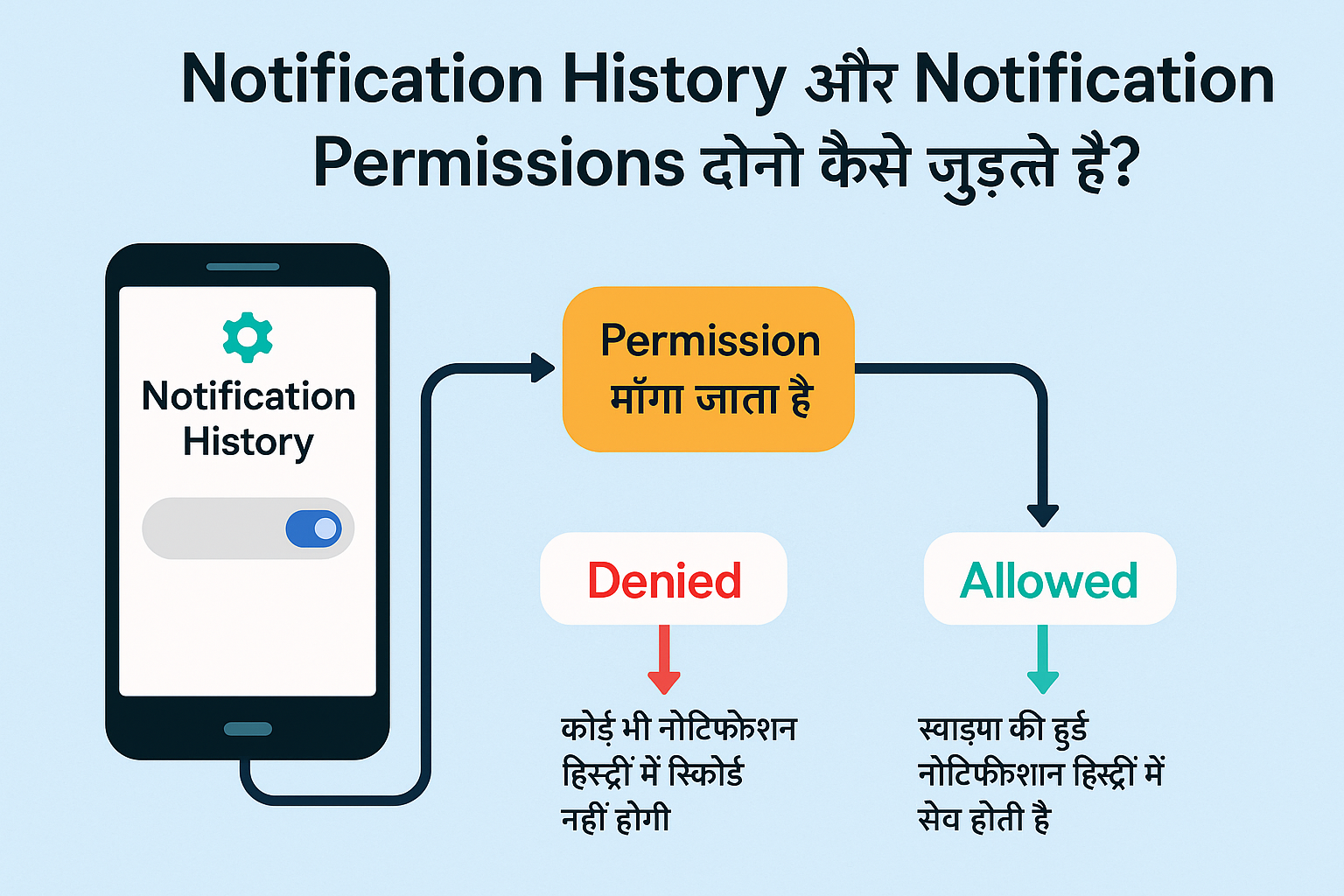
2. कैसे Notification History और Permission model जुड़ते हैं?
- जब आप notification permission deny करते हो किसी spam app को, तो वो app history में record नहीं होती
- यदि permission allow की है, लेकिन user history काल(enabled) नहीं है — तो dismiss हुई notifications record नहीं होंगी
- सही combination से: apps permission माँगे → user accept करे → history ऑन हो → dismissed alerts recover हो सके
❓ People Also Ask Section (Updated)
Android 13 में Notification Permission क्या है?
Android 13 में नया खोजना यह है कि apps को notification permission explicitly मांगा जाता है – जैसे camera या location permissions पहले थे। WIRED
अगर user notification permission deny करे, तो history feature कैसे काम करेगा?
अगर permission deny होगी, तो वह ऐप से कोई notification history record नहीं बनेगी। permission देना जरूरी है यदि आप swipe/hide notification data access करना चाहते हैं।
क्या Android Notification History automated बनाए रखता है?
हाँ, history feature जब ऑन होता है, तो वह automatically last 24 घंटे तक dismissed/snoozed notification record करता है। (source.android).
क्या Notification History में rich media (images, buttons) भी दिखती है?
नहीं, history में rich media disable रह सकता है, सिर्फ title, message preview और timestamp दिखती है। (source OneSignal) onesignal.com
Samsung One UI + Good Lock + NotiStar में ये कैसे काम करता है?
Samsung One UI native history Android से extend होती है; लेकिन अगर आप NotiStar module use करते हो तो 30+ दिन तक history save करना संभव है, searchable alerts, keyword filter और even lock‑screen access मिलता है। techpp.com
🧪 Practical Table: Permission + History दोनों केस
| Scenario | Notification Permission | Notification History | Result |
|---|---|---|---|
| No permission, history ON | NO | YES | कोई भी notification history में नहीं आएगी |
| Permission allowed, history OFF | YES | NO | Notifications आएँगी, लेकिन dismiss नहीं दिखेंगी |
| Permission allowed, history ON | YES | YES | स्वाइप किए गए alerts recover हो सकते हैं |
| Permission denied, history OFF | NO | NO | Notifications block, history blank रहेगा |
| Samsung device + NotiStar enabled | YES | YES (30 days retention) | पुरानी notifications searchable, exportable, lock-screen से भी access हो सकती है |
🧪 Updated Real‑Life Use Cases (Permission + History):
| Scenario | Permission Situation | History Benefit |
|---|---|---|
| किसी new app (shopping) permission माँगता है | आपने allow किया | अगर बाद में alerts irrelevant निकलीं, dismiss करके history से details देख सकते हैं |
| Bank OTP app permission deny कर दिया | Notifications block | फिर OTP miss हो जाए – तुरंत History से नहीं मिलेगा |
| Third-party news app alert at turn-off notification denial | क्या history होगी? | नहीं, क्योंकि alert blocked है |
| App accidentally spam notifications भेज रही है | permission पहले से देना था | history feature से identify कर uninstall किया जा सकता है |
People Also Ask (PAA)
✳️ Android Notification History क्या होती है?
Notification History एक hidden feature है जो आपके swiped‑away या dismissed notifications को last 24 घंटे तक तक store करता है। इसका target accidental misses, snoozed alerts और troubleshooting है। Android Open Source Project
🛠️ Notification History को कैसे ऑन करें?
- Stock Android (Pixel, Motorola आदि):
Settings → Notifications → Notification history → “Use notification history” toggle on करें। AirDroidAndroid Open Source Project - Samsung One UI में:
Settings → Notifications → Advanced Settings → Notification History → toggle on करें।
⏳ यह history कितने घंटे तक रहती है?
Android की default retention period 24 hours होती है। Samsung Good Lock / NotiStar module से यह extend किया जा सकता है (7 दिन से लेकर unlimited तक)। Android Open Source Projectandroidtoz.com
✅ क्या Notification History हर Android phone में होती है?
नहीं, केवल Android 11 और उसके ऊपर वाले phones में होती है। पुराने phones (Android 10 और नीचे) या custom skins में यह हमेशा न हो।
🔐 क्या यह feature सुरक्षित है?
हाँ, यह सिर्फ आपके फोन में store होती है, क्लाउड पर नहीं जाती। लेकिन अगर कोई फोन अनलॉक करके देखे, तो देख सकता है—इसलिए lock‑screen notifications को hide करना बेहतर है। AirDroid
👤 Google Pixel / OnePlus में इसे कैसे खोलें?
Pixel में ऊपर बताया हुआ route valid है। OnePlus, Moto आदि पर भी “Notification History” settings search bar में लिखकर खोल सकते हैं या widget से shortcut बना सकते हैं।
📦 अगर history दिखाई न दे तो क्या करें?
- Settings का cache clear करें
- Android version check करें (min Android 11)
- Samsung users Good Lock → NotiStar install करें जो extended retention और filter features देता है। androidtoz.com
🧪 Real-Life Use Cases – Updated
| परिस्थिती / Situation | Notification History से मिलने वाला लाभ |
|---|---|
| WhatsApp message गलती से swipe हो गया | बिना app खोले message notification से पढ़ सकते हैं |
| Bank OTP या UPI alert मिस हो गया | SMS history में OTP देख सकते हैं |
| Delivery update (Swiggy, Zomato) swipe हो गया | ETA, delivery boy contact फिर से पकड़ सकते हैं |
| YouTube Short / Instagram Live alert गायब हो गया | जिसे देखा था, वही alert history से दोबारा recover किया जा सकता है |
| Job result या exam result alerts miss हो गए | Sarkari app alerts history से फिर check कर सकते हैं |
| Fitness reminder ( जैसा step goal alert) dismiss हो गया | App reminders फिर से recover कर सकते हैं |
| OTP की जगह पर कोई scam notification मिला था | History से identify कर सकते हो कि कौनसी app spamming कर रही थी |
| Flight/hotel booking confirmation alert हट गया | Ticket details history से देख सकते हैं |
| Zoom/Online class link alert miss हो गया | session link फिर वापस पाइए |
| पेरेन्टल control alerts hide हो गए | कौनसी app, कितनी notifications भेज रही थी, trace कर सकते हैं |
🔧 Advanced Tips:
- यदि Samsung Galaxy S25+ जैसे नए phones में history सिर्फ एक‑दो घंटों का record दिखा रहा है (पर 24 नहीं), तो यह Android 15 bug हो सकता है। ऐसे में NotiStar पर switch करना बेहतर है।
- MIUI/XIAOMI devices पर native history missing हो सकती है — वहाँ Activity Launcher या QuickShortcutMaker से manual “notification log” activity access करके visible बनाया जा सकता है। reddit.comreddit.com
- यदि history feature को secure रखना हो, तो settings में lock‑screen notification hide और app permissions review करना चाहिए।
- Advanced Tips & Tricks:
- Use Good Lock + NotiStar for Samsung devices to get keyword-based filtering, longer retention (choose between 7 days to unlimited) और lock‑screen access. androidtoz.com
- Notification Log widget उपयोग करें यदि setting menu में नहीं दिखता (Nova Launcher या Activity Launcher help कर सकता है)।
- Combine with Digital Wellbeing tools to manage apps जो ज्यादा notifications भेजते हैं।
Photography ya Imaging features में interest है? पढ़ें:
📲 [ऐसे कैमरों वाले फोन जिन्हें आप टेक्नो का स्मार्टफोन DSLR कह सकते हैं]
🏁 निष्कर्ष
- Android 11 ने Notification History feature introduce किया, ताकि dismiss की हुई alerts वापस देखें जा सकें। xda-developers.comsource.android.com
- Android 13 ने notifications के लिए strict permission model लाया — जिससे spam को रोकना आसान हुआ। WIRED
- दोनों features का सही combination आपको high control, privacy और usability देता है।